How to Verify Your Google Business Profile: Methods, Video Verification & Troubleshooting

 Chat on WhatsApp
Verification proves that the person managing a Google Business Profile is actually authorised to represent that business. Google — not the business owner — determines which verification method is offered, and different businesses can be offered different options based on their type, information, and region. Video verification is common and has specific evidence requirements, covered in detail below. One distinction matters immediately: being verified is not the same as ranking well. Verification makes a profile eligible to appear; it says nothing about how competitively it shows up against other businesses for a given search.
How Do You Verify a Google Business Profile?
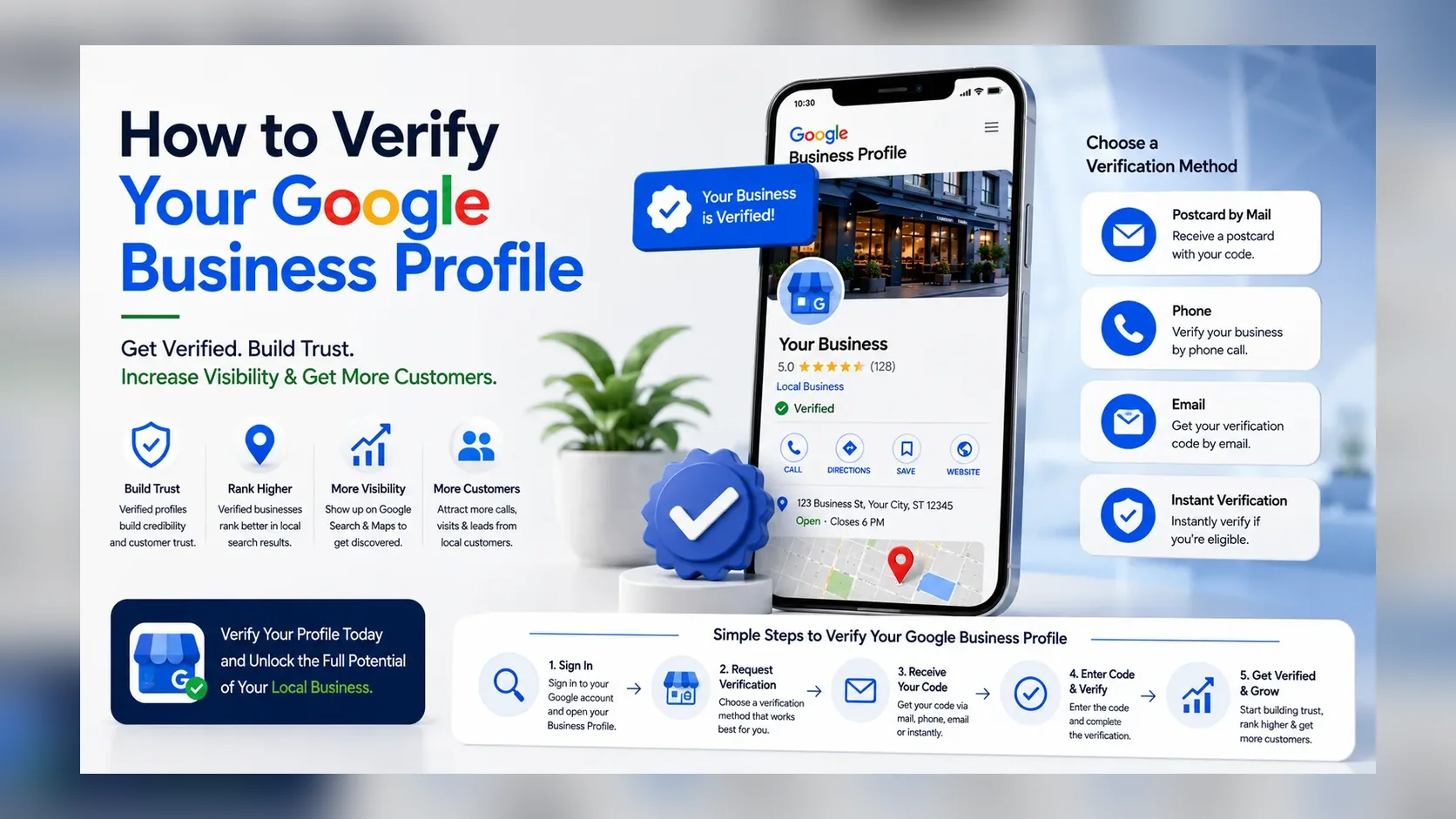
To verify a Google Business Profile, go to your profile and select "Get verified," then complete whichever method Google offers — commonly phone/text, email, a live video call with a Google representative, or a video recording you submit yourself. You don't choose the method; Google determines what's available based on your business. If nothing appears, or every option fails, Google's support process is the next step, not creating a new profile.
Google Business Profile Verification Problem Finder
| What you see | What it usually means | What to check next |
|---|---|---|
| "Get verified" prompt | Profile exists but verification hasn't been completed | Complete the method Google is offering |
| "Verification processing" | Submission is under review | Wait for Google's stated review period; avoid major edits |
| "Review issues" | Submitted evidence (often video) didn't satisfy requirements | See "What Does 'Review Issues' Mean" below |
| "No more ways to verify" | Self-service verification paths have been exhausted | See the dedicated section below — don't create a new profile |
| Verified, but not ranking well | Verification succeeded; this is a separate ranking problem | how to rank higher on Google Maps |
| Profile shows "Suspended"/"Disabled" | A different, policy-related problem | how to reinstate a suspended Google Business Profile |
| Business can't be found at all | May be a setup or visibility issue, not only verification | why your business isn't showing on Google Maps |
Why Does Google Require Business Profile Verification?
Verification exists to confirm that whoever is managing a profile genuinely represents the business, protecting against fraudulent claims and inaccurate information reaching searchers. It's a legitimacy and accuracy check, not a formality — an unverified profile generally can't appear fully in Search or Maps, because Google has no confirmation the information is trustworthy.
What Google Business Profile Verification Methods Are Available?
Google currently documents several methods, and automatically determines which ones a specific profile can use — you cannot request a method that isn't offered to you (Verify your business on Google).
| Verification method | How it works | Who may see it | Important limitation |
|---|---|---|---|
| Phone or text | A code is sent to the business phone number | Businesses with a verifiable phone number | Not offered to every profile |
| A code is sent to an email address tied to the business | Where an eligible business email exists | A non-business-domain email may need extra steps | |
| Video recording | You record and upload evidence via the Business Profile app | Common for many storefront and service-area businesses | Must be live-captured, continuous, at least 30 seconds — see below |
| Live video call | A Google representative verifies you over a live video call | Not available for every business | Restricted to the business's local business hours |
| Postcard by mail | A code is mailed to the business address | Where currently offered | Not guaranteed to appear as an option for every profile |
| Bulk verification | Multiple locations verified together | Qualifying multi-location organisations only | Requires meeting Google's bulk-eligibility criteria |
Can You Verify a Google Business Profile Without a Postcard?
Yes, if Google offers you a different eligible method — postcard is not the only option, and for many profiles it isn't offered at all. What you cannot do is force Google to provide phone, email, or video verification if the system hasn't made it available to your profile. Postcard verification shouldn't be treated as the default or fallback method; it's simply one of several Google may or may not present, and the available options can differ business to business.
How Does Google Business Profile Video Verification Work?
Video recording verification has specific, documented requirements (Verify your business with a video recording):
- Must be captured live — pre-recorded footage isn't accepted, and you can't film offline and upload it later.
- Unedited, continuous, and unique — a single unbroken recording, at least 30 seconds long.
- Recorded and uploaded from a mobile device, through the Business Profile app itself, not a separate camera or desktop upload.
- Location evidence — your current surroundings: outside signage, street names, nearby businesses, or other context confirming where you are.
- Proof the business exists — the tools, equipment, products, workspace, business cards, or branded apparel genuinely used in the business.
- Proof of management — either performing a service or accessing business-only areas/assets on camera, or showing a document (business permit, invoice, utility bill) that matches the name on the profile.
Professional interpretation: the recording is effectively building a single, continuous case — location, then existence, then control — rather than three separate clips. Treat it as one coherent shot, not a checklist to tick off in any order.
[ORIGINAL SCREENSHOT: Show Google's video verification requirements screen.]
Google Business Profile Video Verification Checklist
Storefront Business Video Checklist
- Surrounding street/location identifiers (signage, street name, nearby landmarks)
- Building number where visible and applicable
- Permanent exterior business signage matching the profile name
- Interior of the business environment
- Employee-only or management-access areas
- Point-of-sale or operational equipment where genuinely present
Service-Area Business Video Checklist
Service-area businesses don't serve customers at a fixed address, so the evidence looks different — and Google's own guidance is that a service-area business without in-person customer contact at its address should keep that address hidden. Don't publicly reveal a residential address on camera or on the profile to satisfy this checklist.
- An identifiable area near the genuine business base, without exposing a private residential address unnecessarily
- Tools and equipment genuinely used for the work
- A branded vehicle, if one is legitimately used
- Workspace or storage area for the business
- Business documents where appropriate (permit, invoice, utility bill matching the business name)
- Evidence of performing the service or controlling business assets
Hybrid Business Video Checklist
A hybrid business both serves customers at a location and travels to them. Combine the relevant storefront evidence (exterior, signage, interior) with service-area evidence (equipment, vehicle, work being performed) — the video should reflect both sides of how the business genuinely operates, not just one.
A Simple Video Verification Recording Sequence
This is an original, practical way to organise one continuous recording — not a Google-mandated timing requirement:
- Start with location context — surroundings, signage, street identifiers.
- Then exterior and permanent identification (storefront businesses) or your operating base (service-area businesses).
- Then business-existence evidence — products, tools, workspace, or service equipment.
- Finish with management proof — performing a task, accessing business-only areas, or showing a matching document.
Following a logical order like this makes it easier to capture everything in one unbroken shot; it doesn't guarantee approval on its own.
Stuck on Google Business Profile Verification?
If you're not sure why your profile won't verify, request a free initial Google Business Profile verification audit. I'll review the obvious profile setup, business type, verification requirements and potential evidence gaps before you keep submitting the same unsuccessful verification.
Why Is My Google Business Profile Video Verification Not Working?
A rejected video usually means the evidence didn't clearly satisfy one of the three requirements above, not that the business itself is ineligible. Common causes worth checking: the business name isn't clearly visible or doesn't match the profile; insufficient location context (no street signs or identifiable surroundings); a storefront with no permanent signage on camera; no proof of management or access; the recording wasn't continuous (breaks, cuts, or edits); it was pre-recorded rather than captured live in-app; a service-area business showing too little genuine operational evidence; or the visible evidence doesn't match the information on the profile (wrong name, wrong location context). Upload failures and basic eligibility problems are also worth ruling out before re-filming.
What Does "Review Issues" Mean in Google Business Profile Verification?
"Review issues" means Google reviewed your submitted evidence and found it insufficient — you can typically fix the specific issues raised or submit a new verification attempt. The right response is a new recording that includes what was missing, not a repeat of the same footage. Submitting an identical failed video again doesn't add new evidence for Google to review.
How Long Does Google Business Profile Verification Take?
There's no single figure that applies to every method. Google's own guidance states that verification review can take up to five business days to maintain the integrity of the profile (Verify your business on Google). Different methods can behave differently in practice, and business owners commonly report waits both shorter and longer than this in Google's own Business Profile Community — treat five business days as Google's stated figure, not a guarantee.
Why Is Google Business Profile Verification Taking So Long?
If you're past the stated review window with no update, worth checking rather than assuming: the submission may genuinely still be under legitimate review; the evidence provided may not have been sufficient (check for a "Review issues" message); business information may have changed recently, restarting part of the process; more than one verification step may have been requested; or there's a technical upload problem. Don't assume a delay automatically means something is wrong — but don't wait indefinitely without checking for a status message either.
Why Is My Google Business Profile Still Not Verified?
Work through this in order rather than guessing:
- Confirm the current profile status — log in and check exactly what's displayed.
- Check whether a submission is under review — if so, the next step is waiting for Google's stated timeframe.
- Look for a "Review issues" message — this means action is needed, not more waiting.
- Check whether Google is now offering a different verification method — options can change.
- Confirm business eligibility and configuration — category, business model, and information all matter.
- Review profile information for inconsistencies — name, address, and category should all match reality and each other.
- Use Google's current support process once genuine self-service options are exhausted.
What Should You Do If There Are "No More Ways to Verify"?
Contact Google's official Business Profile support/help process, and have your evidence — location, existence, and management proof — ready before you do. Don't create a second profile to route around this — that risks a duplicate flag on top of the original problem. Don't fabricate a business address, and don't assume support guarantees a live video call or that a new method will automatically appear; support can review your specific situation, but it isn't a bypass of Google's verification requirements.
Why Is Google Asking Me to Verify My Business Again?
Google's own guidance is that certain changes — most notably a business name change after a profile is already verified — can trigger a re-verification requirement (Edit your Business Profile; Verify your business with a video recording). Other significant information changes can have the same effect, since Google is re-confirming accuracy after something material changed. Re-verification is not automatically the same thing as suspension — it's a standard accuracy check, not necessarily a sign anything has gone wrong.
What Should You Avoid Changing During Verification?
Avoid unnecessary major edits — name, category, address, phone, or website — while you're actively trying to establish consistent evidence for an open verification. None of these fields should be manipulated purely to try to pass verification faster; they should simply, accurately describe the real business. If a change is genuinely necessary, expect it may affect the verification timeline rather than assuming it won't.
Google Business Profile Verification for Service-Area Businesses
A service-area business visits or delivers to customers rather than serving them at its own address — a plumber or mobile groomer, for example. If you don't see customers at your business address, Google's guidance is that the address should be hidden on the public profile, not shown. This affects verification evidence directly: your video and any documents should demonstrate the business is real and that you manage it, without exposing a private address unnecessarily. Legitimate evidence includes tools, a branded vehicle, workspace, and documents matching the business name — not a rented address, a temporary sign, or a fabricated storefront used purely to look like a fixed location.
Google Business Profile Verification for Home-Based Businesses
A genuine home-based service-area business can operate from a residential address while keeping that address hidden from the public profile, provided it doesn't serve customers at that address — the same rule as any other service-area business. When filming verification evidence, be mindful of privacy: there's no requirement to show sensitive personal details, house numbers, or family members on camera. This is different from an online-only business with no direct, in-person customer-facing operation — Google's eligibility rules generally don't extend a standard Business Profile to businesses that never make in-person contact with customers at all.
Google Business Profile Verification for Multiple Locations
Each genuine, separate business location is its own profile and generally needs its own verification, though qualifying multi-location organisations may be eligible for bulk verification of several locations at once. Keep organisation-level information (legal name, ownership) consistent across locations, and make sure anyone verifying or managing profiles on the business's behalf is a genuine authorised representative. Field-by-field, multi-location profile management is a deeper topic on its own — this section covers verification only.
Video Verification Rejected?
Send me your business type, city/service area and the issue Google is showing. The initial audit can help identify what to check before you record another verification video.
Review My Verification Problem →
Verification vs Ranking: Why a Verified Profile May Still Not Appear in the 3-Pack
Verification confirms you're authorised to manage an eligible profile — it is not a promise of a #1 position, 3-pack inclusion, first-page visibility, or instant leads. Ranking is governed by a separate framework — relevance, distance, and prominence relative to other businesses — and a freshly verified profile starts that competition from wherever it starts, regardless of how smoothly verification went. See how to rank higher on Google Maps for what actually affects ranking once verification is done.
Verification vs Visibility: What If the Business Still Doesn't Show?
A profile can be fully verified and still not appear the way you'd expect — this points to a different set of causes than verification itself, including eligibility, duplicate flags, or address configuration. See why your business isn't showing on Google Maps if verification is complete but the business still can't be found.
Verification vs Suspension: What If the Profile Becomes Suspended?
Suspension or restriction is a distinct, policy-driven problem, separate from normal verification or re-verification, and it needs its own process to resolve. See how to reinstate a suspended Google Business Profile if your profile shows as suspended or disabled rather than simply unverified.
What Not to Do When Google Business Profile Verification Fails
- Don't create multiple duplicate listings hoping one verifies — this risks a duplicate flag that can suppress every version.
- Don't use a fake or borrowed location — this violates Google's representation policy and risks suspension, not just a failed attempt.
- Don't rent a temporary office purely to manufacture eligibility — the same representation risk applies.
- Don't create temporary signage just for the verification video — evidence should reflect how the business genuinely, permanently operates.
- Don't add keywords to your real business name to try to influence anything — it's a policy violation, unrelated to verification success.
- Don't repeatedly resubmit the same inadequate footage — if it failed once, submit new evidence addressing what was actually missing.
- Don't upload edited or pre-recorded footage where Google requires a live, continuous recording — this is a documented rejection cause.
- Don't expose sensitive personal information on camera, especially for home-based businesses.
- Don't assume another business's verification method will be offered to you — availability is determined per profile.
- Don't pay anyone claiming they can bypass Google's verification system — no legitimate service can guarantee this, and it risks the profile far more than a slow verification does.
Verification Failure: What Should I Fix First?
An original priority order, not a restatement of Google's own help pages:
- Business eligibility — confirm the business genuinely qualifies for a profile at all.
- Correct business model — storefront, service-area, or hybrid, configured accurately.
- Accurate business information — name, address/area, category all matching reality.
- Verification method requirements — know exactly what the offered method needs before attempting it.
- Location evidence — can you clearly demonstrate where the business operates?
- Business-existence evidence — tools, products, workspace genuinely shown.
- Management/ownership evidence — proof you control the business, not just that it exists.
- Google-requested missing evidence — address the specific "Review issues" gap, not a generic resubmission.
- Technical upload issues — rule out a simple failure before assuming a content rejection.
- Official support — once genuine self-service options are exhausted, escalate with evidence ready.
Official Google Resources Used
- Verify your business on Google
- Verify your business with a video recording
- Edit your Business Profile
- Manage your service areas for service-area & hybrid businesses
- Business eligibility and ownership guidelines
Verification methods, video requirements, review timeframes, and re-verification triggers referenced in this article reflect Google's official Business Profile Help documentation as of August 2026. Availability of specific verification methods can vary by business, account, and region, and Google's interface and policies change periodically — always confirm current requirements against Google Business Profile Help before acting.
Chat on WhatsAppFrequently asked questions
How do I verify my Google Business Profile?
Go to your profile, select "Get verified," and complete whichever method Google offers — you don't choose the method yourself. Common options include phone/text, email, a live video call, or a video recording submitted through the Business Profile app.
How long does Google Business Profile verification take?
Google states that verification review can take up to five business days. Different methods can behave differently, and delays beyond this are commonly reported, though five business days is Google's own stated figure.
Can I verify Google Business Profile without a postcard?
Yes, if Google offers a different eligible method to your profile — postcard isn't the only option and isn't offered to every business. You can't request a specific method Google hasn't made available to you.
Why did my Google Business Profile video verification fail?
Usually because the evidence didn't clearly show location context, proof the business exists, or proof of management — or because the recording wasn't a continuous, live, unedited capture of at least 30 seconds.
Can I upload a pre-recorded verification video?
No. Google's requirement is a live, continuous recording captured and uploaded through the Business Profile app — pre-recorded or edited footage isn't accepted.
How long should a Google Business Profile verification video be?
At least 30 seconds, as one continuous, unedited recording — not several separate clips.
Why am I being asked to verify my business again?
Most commonly because of a business name change, or another significant information change, after the profile was already verified. This is a standard accuracy check, not automatically the same thing as a suspension.
Can a service-area business complete video verification?
Yes — the evidence looks different from a storefront (tools, vehicle, workspace, documents rather than exterior signage), and the public address should stay hidden throughout, matching Google's service-area address guidance.
Get direct help with this
Ready to Grow Your Business?
Whether you're recovering an eBay account, launching an Amazon brand, improving your SEO, or scaling with AI automation, let's discuss the best strategy for your business.
Chat on WhatsApp Now